FTO Screen
Before launch, find the US and Chinese patents closest to your product. How to run the screen, what you get, and what it costs.
What it does, and what it doesn't
Freedom to operate (FTO) means you can make and sell a product in a market without infringing a patent that is still in force there.
The FTO Screen is a first pass. It breaks your product into technical features, searches our US and Chinese patent databases several ways, and lists the closest patents with abstract-level evidence and open questions.
It does not:
- compare claims element by element, or conclude whether you infringe;
- cover markets outside the US and China, such as Europe, Japan or Korea.
Claim-by-claim comparison, equivalents analysis and a risk rating are in the FTO Full Report, which you can unlock from your screen results. It is also AI-generated and not a legal opinion.
The formal FTO opinion that investors, customs authorities and marketplaces ask for must be signed by a licensed patent attorney. Nothing here replaces it.
Who it's for
- Teams about to manufacture or launch a new product.
- Sellers heading for the US or Chinese market, including through online marketplaces.
- Anyone preparing for a trade show or due diligence, or switching suppliers or technology.
What to prepare
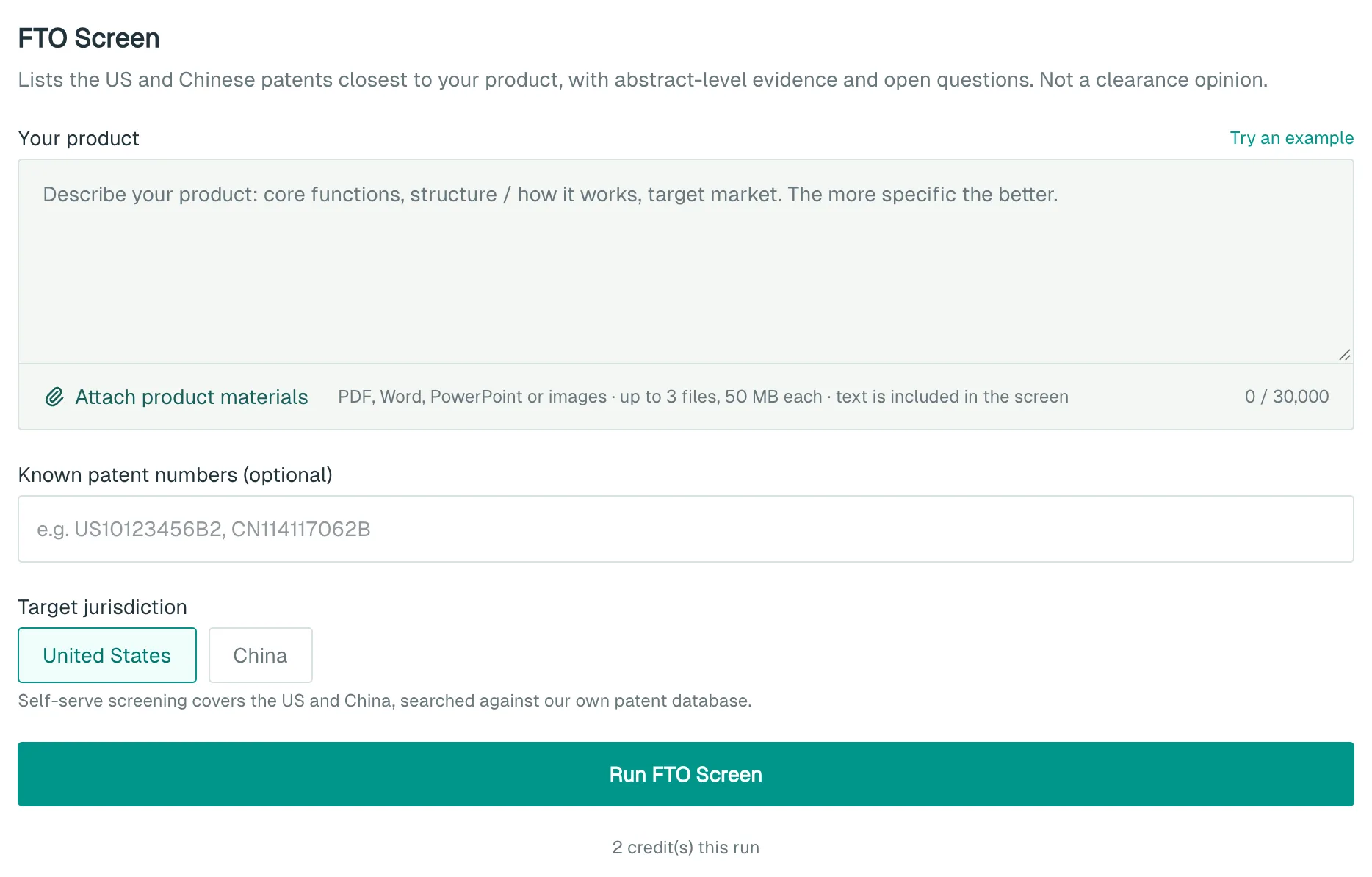
- A product description: core functions, how it is built or works, and the target market.
- Product materials (optional): PDF, Word, PowerPoint, JPG or PNG, up to 3 files of 50 MB each. Their text is added to your description.
- Patent numbers you already know about (optional), such as US10123456B2. Up to 8 are included.
Description and materials together are capped at about 30,000 characters.
Step by step
- Open the FTO page.
- Describe your product under Your product, or click Try an example to see how it works.
- Click Attach product materials, or drag files into the box.
- Add known patents under Known patent numbers (optional).
- Under Target jurisdiction, select United States, China or both.
- Click Run FTO Screen. You will be asked to sign in first if you haven't.
Upgrading to the FTO Full Report
- Your results include an "Unlock the FTO Full Report" card. It states which jurisdiction will run and the price.
- Click Unlock full report. The report starts straight away from your screen input, and the credits are charged then.
- Wait 1–3 minutes. You can leave the page in the background.
What you get
FTO Screen results
- Related patents, grouped by jurisdiction: number (click to open), estimated legal status, title and assignee.
- Plain-language cards for some patents: "In one line", "How it works" and "Close to your description". Click Show abstract excerpt to see where each line comes from.
- Search sources: the features searched and the hits per database.
- Open questions the screen cannot answer.
Results are saved to your run history. Click Share to create a link.
FTO Full Report
- Executive summary, search queries and screening funnel.
- Claim charts and a risk matrix (RED / YELLOW / GREEN).
- Equivalents and estoppel analysis, an invalidity assessment of the closest patents, and design-around directions.
- Export PDF and Export Word. After New report, My reports lists your last 10 reports for re-download.
Cost
The FTO Screen costs 2 credits / run.
Each FTO Full Report covers one jurisdiction. Your first order is 50 credits / run, and later reports are 100 credits / run. A failed and refunded first order doesn't use up the first-order price.
Failed runs are refunded automatically. If your balance is too low, nothing runs and nothing is charged. See Account and credits.
Things to know
- Legal status is estimated. Confirm each patent against the official register.
- Cards and evidence come from the abstract only. The claims decide what a patent protects.
- Once you have seen these patents, you know about them. Carrying on without review can support a finding of wilful infringement and higher damages, so have a patent attorney or patent agent review them before launch.
- Finding nothing does not mean you are clear to launch.
- The same input run again within 24 hours returns the same results and is charged as normal.
- For a second jurisdiction in the full report, click New report, choose Target Jurisdiction (Patent Office) and click Start Analysis. It is charged separately.
What to do next
- Blocked by a particular patent? Read Design-Around Analysis. Go to “Design-Around Analysis” under your results carries your description across.
- Take your results and open questions to a patent attorney or patent agent for a formal FTO analysis.