Design-Around Analysis
When one patent blocks your product, find possible routes around it, or build a new product design from expired patents.
What it does, and what it doesn't
The tool has two modes:
- Competitor design-around: scan the related patents, then generate a full run. It breaks down the target patents' independent claims, finds the weakest limitation, and proposes several design-around directions, each self-checked under the doctrine of equivalents.
- Expired-patent portfolio design: searches expired patents first and combines what they teach into one new product design reference.
It does not decide whether you infringe, and it is not a formal FTO. Risks are graded only to rank them. Looking as if you can get around a patent does not mean you are legally free to. The output is an engineering design reference and R&D record, not a legal opinion.
Who it's for
- Engineering and product leads blocked by one key patent who would rather not drop the product or litigate.
- Teams that want to build a new product on technology from expired patents.
What to prepare
- The product you want to build: core functions, structure or how it works, and how it differs from the competitor's. The full run needs this.
- For a competitor design-around, optionally: competitor patent numbers (publication or grant numbers only), a description of their product, and their company name. The scan needs at least a patent number or some description.
You cannot upload files here.
Step by step
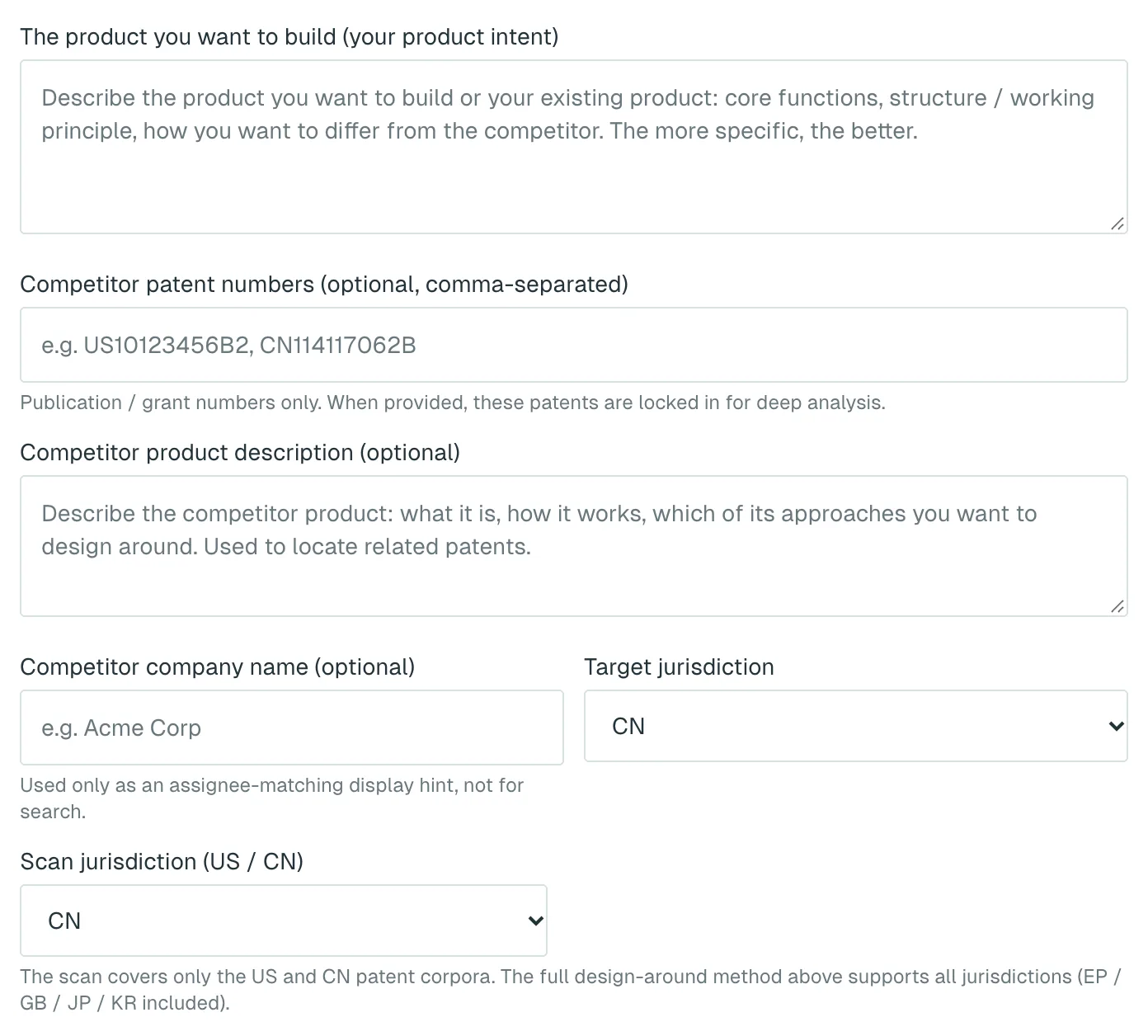
Competitor design-around
- Open Design-Around Analysis and choose Competitor design-around.
- Fill in The product you want to build (your product intent), plus optional fields such as Competitor patent numbers (optional, comma-separated).
- Under Target jurisdiction, pick your market. Under Scan jurisdiction (US / CN), pick which database to scan.
- Click Scan related patents. You will be asked to sign in first if you haven't.
- Click Generate the full design-around. The button shows the regular price, with the first-run price next to it.
- When the report is ready, export it with Export PDF or Export Word.
Expired-patent portfolio design
- Choose Expired-patent portfolio design.
- Fill in The product you want to build (product goal) and pick a Target jurisdiction.
- Click Generate portfolio design. There is no scan in this mode, so credits are charged when it starts.
What you get
Related-patent scan
A list of real search hits: patent number, technical relevance out of 10, estimated legal status (check the official register), title and assignee. Some patents have a plain-language card, written from the abstract, showing what the patent covers and where it is close to your description. The list is not a risk rating.
Competitor design-around report
- An overall signal, such as "Take to counsel first".
- Candidate directions: which claim element each avoids, the substitute design, feasibility and difficulty, and the equivalents self-check result.
- A product design reference with architecture, key modules and a roadmap. Uncertain points are marked "Verify in R&D".
- A difference table against the target patents and a verification checklist. Candidates found equivalent go into an appendix.
Expired-patent portfolio report
- The teaching combination and a feature × document teaching matrix.
- Substitute designs for features taught only by patents still in force, flagged "Active-patent teaching — formal FTO required before launch".
Both reports export to PDF and Word and are saved to your run history. Sharing only shares the scan list.
Cost
- Related-patent scan: 1 credit / run. No charge if nothing is found.
- Competitor design-around: 30 credits / run.
- Expired-patent portfolio design: 50 credits / run.
- Your account's first full run, in either mode: 15 credits / run.
The price is set automatically from your account history. Failed runs are refunded in full automatically, and a refunded first run keeps your first-run price. See Account and credits.
Things to know
- The scan covers US and Chinese patents only. The full run can target CN, US, EP, GB, JP or KR.
- To have the full run analyse the patents you saw in the scan, set both jurisdictions to the same market. Otherwise it searches again.
- A competitor design-around examines up to three of the most relevant patents in depth.
- Before building any direction, have your engineers check feasibility and a patent attorney or patent agent confirm it.
- If your design is unpublished, describe only as much as the analysis needs.
What to do next
- Once the new design is settled, run an FTO Screen to see which patents sit around it.
- Take the report and checklist to a patent attorney or patent agent to confirm your freedom to operate after the change.